





ERP and CRM Integration: Benefits, Process, and How to Connect Both Systems
Businesses often use ERP (Enterprise Resource Planning) and CRM (Customer Relationship Management) software for different purposes.
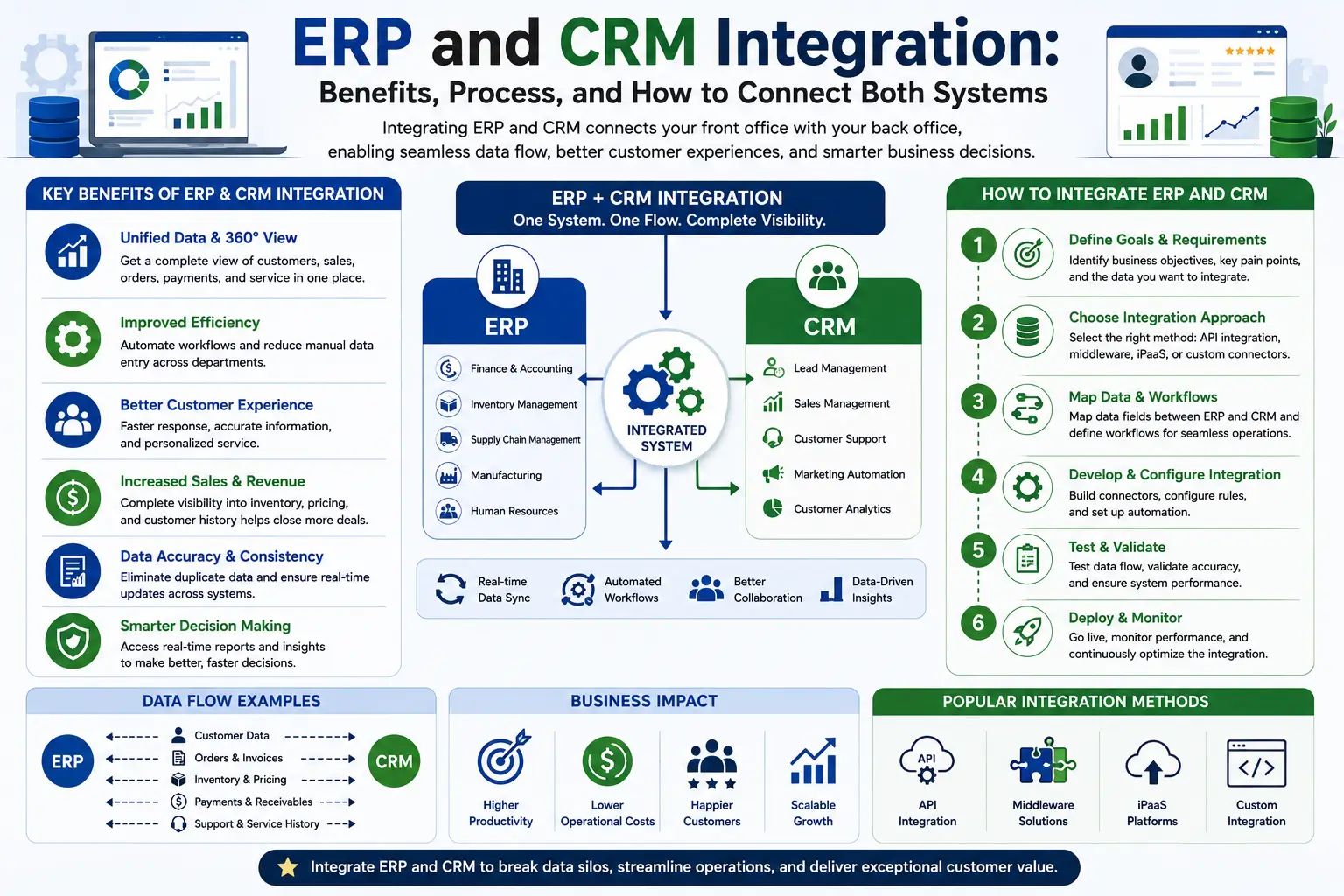
CRM manages leads, customers, sales, marketing, and customer support, while ERP manages accounting, inventory, procurement, manufacturing, HR, payroll, and other internal operations.
The real advantage comes when these two systems are integrated so important information can move between them automatically.
Instead of employees switching between multiple systems, integration can provide a more connected view of customers, orders, inventory, payments, and business operations.
What Is ERP and CRM Integration?
ERP and CRM integration means connecting the two software systems so that selected data can be exchanged between them.
For example:
CRM → Customer & Sales Data → ERP
and
ERP → Order, Inventory & Financial Data → CRM
The goal is not necessarily to put every piece of data into both systems. Instead, businesses should synchronize the information that different teams actually need.
A typical integrated workflow can look like:
Lead → CRM → Customer → Sales Order → ERP → Inventory → Delivery → Invoice → CRM
Why Integrate ERP and CRM?
Without integration, employees may have to manually transfer information.
For example:
A salesperson creates a customer in CRM.
Then the accounting team may have to manually create the same customer in ERP.
Later, an order may need to be entered again.
This can result in:
- Duplicate data entry
- Human errors
- Outdated information
- Delayed order processing
- Poor visibility
- More administrative work
Integration can automate the movement of relevant information between the two systems.
What Data Can Be Shared Between ERP and CRM?
The exact data depends on the software and integration design.
Commonly synchronized information includes:
Customer Data
- Customer name
- Contact details
- Company information
- Billing information
- Shipping information
Sales Data
- Quotations
- Sales orders
- Products
- Prices
- Discounts
- Deal values
Product Data
- Product names
- SKUs
- Product descriptions
- Pricing
- Availability
Inventory Data
- Stock availability
- Warehouse information
- Stock status
Financial Data
- Invoices
- Payment status
- Outstanding balances
- Credit information
Customer Service Data
Depending on the platforms, selected service or support information can also be shared.
How Does ERP and CRM Integration Work?
There are several technical approaches.
1. API Integration
An API (Application Programming Interface) allows one software system to communicate with another.
For example:
CRM API ↔ Integration Layer ↔ ERP API
When a customer is created in CRM, the integration can send the relevant information to ERP.
Similarly, when an order is processed in ERP, selected information can be sent back to CRM.
API-based integration is one of the most common approaches for modern cloud applications.
2. Middleware Integration
Businesses can use middleware or an integration platform between ERP and CRM.
The architecture looks like:
CRM → Middleware → ERP
The middleware can:
- Transform data
- Map fields
- Apply business rules
- Handle authentication
- Monitor integrations
- Manage errors
- Synchronize records
This approach can be useful when the integration involves multiple applications or complex workflows.
3. Webhooks and Event-Based Integration
Some platforms support webhooks or event-driven integrations.
For example:
Event: New customer created in CRM
↓
Webhook: Sends customer information
↓
ERP: Creates or updates customer record
Another example:
ERP Event: Invoice paid
↓
Integration: Sends payment status
↓
CRM: Updates customer account
This approach can provide near-real-time synchronization when supported by the platforms.
4. Scheduled Data Synchronization
Not every integration needs to operate in real time.
Some businesses synchronize information periodically.
For example:
- Every 15 minutes
- Hourly
- Daily
- At specific scheduled intervals
This approach may be sufficient for less time-sensitive information and can sometimes reduce system complexity.
What Should Be the “Single Source of Truth”?
This is one of the most important decisions in ERP-CRM integration.
Businesses should define which system is authoritative for each type of information.
For example:
| Data | Primary System |
|---|---|
| Leads | CRM |
| Sales opportunities | CRM |
| Customer interactions | CRM |
| Marketing campaigns | CRM |
| Product master | ERP |
| Inventory | ERP |
| Procurement | ERP |
| Accounting | ERP |
| Invoices | ERP |
| Payroll | ERP |
This prevents conflicts where both systems try to become the primary source for the same data.
How to Make Data Visible in One Place
There are two different meanings of “one place.”
Option 1: Data Synchronization
Important data is copied or synchronized between systems.
For example:
CRM shows customer + order status
while
ERP shows customer + order + accounting information.
Option 2: Unified Dashboard
A dashboard or business intelligence layer can pull information from both systems and display it in one interface.
For example:
Customer Dashboard
- Customer name
- Sales opportunities
- Previous orders
- Current order
- Invoice status
- Payment status
- Support requests
This can give managers a unified view without necessarily moving every record into one application.
Example: CRM and ERP Integration for a Business
Imagine a company selling industrial equipment.
Step 1: Lead Generation
A potential customer submits a form on the website.
Website → CRM
The CRM creates the lead.
Step 2: Sales Process
The sales representative contacts the prospect and creates an opportunity.
CRM → Sales Pipeline
Step 3: Customer Conversion
The prospect accepts the quotation.
CRM → Customer/Order
Step 4: ERP Processing
The order is sent to ERP.
ERP → Inventory → Procurement → Fulfillment
Step 5: Invoice
ERP generates the invoice.
ERP → Accounting
Step 6: CRM Update
The invoice/order status is made available to the CRM.
ERP → CRM
Now the salesperson can see relevant order information without contacting the accounting or operations team for every update.
Benefits of ERP and CRM Integration
1. One Connected View of the Customer
Sales teams can access relevant information about:
- Customer
- Orders
- Products
- Payments
- Support
- Previous purchases
This can improve customer conversations.
2. Reduced Duplicate Data Entry
Instead of entering customer information into two systems, integration can transfer it automatically.
This saves time and can reduce data-entry errors.
3. Better Sales Visibility
Sales teams can see relevant operational information such as:
- Product availability
- Order status
- Delivery status
- Invoice status
This can help them provide more accurate information to customers.
4. Faster Order Processing
Once a sales order is transferred from CRM to ERP, operational teams can begin fulfillment without manually re-entering the order.
5. Improved Customer Service
Support teams can potentially see information about:
- Orders
- Purchases
- Invoices
- Payments
- Customer history
This can make issue resolution more efficient.
6. Better Reporting
Management can combine customer and operational information to understand the complete business cycle.
For example:
Lead → Sale → Order → Revenue → Customer Retention
This provides a broader view than analyzing CRM or ERP data separately.
7. Improved Data Accuracy
Automated synchronization can reduce inconsistencies caused by manually maintaining the same information in multiple systems.
However, integration must be properly designed and monitored; automation does not automatically guarantee data quality.
ERP and CRM Integration Architecture
A basic architecture can look like this:
CRM
↓
API / Middleware / Integration Platform
↓
ERP
And information can move in both directions:
CRM → ERP
- Customer
- Sales order
- Product selections
- Billing information
ERP → CRM
- Inventory availability
- Order status
- Shipment status
- Invoice status
- Payment status
The exact architecture depends on the ERP and CRM platforms.
Step-by-Step Guide to Integrating ERP and CRM
Step 1: Identify the Business Requirements
First, decide why the integration is needed.
For example:
- Sales needs inventory visibility.
- CRM needs order status.
- Finance needs customer information.
- Management needs combined reporting.
Step 2: Identify the Systems
Document:
- ERP platform
- CRM platform
- Database
- APIs
- Existing integrations
- Third-party applications
Step 3: Decide What Data Should Be Synchronized
Do not synchronize everything automatically.
Identify the essential information.
For example:
CRM → ERP
- New customers
- Sales orders
- Billing details
ERP → CRM
- Product availability
- Order status
- Invoice status
Step 4: Map the Data Fields
The same field may have different names in each system.
For example:
CRM: Customer Name
ERP: Account Name
The integration must map these fields correctly.
Step 5: Choose the Integration Method
Depending on the systems, choose:
- API integration
- Middleware
- Web hooks
- Integration platform
- Scheduled synchronization
- Custom integration
Step 6: Establish Data Ownership
Decide which system is the source of truth for each data type.
For example:
CRM = Leads and sales opportunities
ERP = Inventory and accounting
Step 7: Build and Test the Integration
Test important scenarios such as:
- New customer
- Duplicate customer
- New order
- Updated order
- Cancelled order
- Product update
- Inventory change
- Invoice creation
- Payment update
Step 8: Monitor the Integration
After launch, monitor:
- Failed API calls
- Duplicate records
- Missing data
- Synchronization delays
- Authentication problems
- Field mapping errors
A proper error-handling and monitoring mechanism is essential for reliable integration.
Common Challenges in ERP and CRM Integration
Integration can provide major benefits, but it also requires careful planning.
Data Duplication
The same customer may exist in both systems with slightly different information.
Data Mapping
Different systems may use different field names and formats.
Security
Customer and financial data must be transferred securely and access must be controlled.
API Limitations
Some platforms impose API limits or restrict certain functionality to specific plans.
Legacy Software
Older ERP or CRM systems may not provide modern APIs.
Synchronization Conflicts
If users modify the same record in different systems, conflicts can occur.
Maintenance
Software updates can change APIs or integrations, requiring ongoing maintenance.
ERP + CRM Integration for Small Businesses
Small businesses do not necessarily need a highly complex integration architecture.
A simple setup may be enough:
CRM → API → ERP
For example:
CRM manages:
- Leads
- Customers
- Sales
- Follow-ups
ERP manages:
- Inventory
- Accounting
- Orders
- Procurement
The integration shares only the information that both teams need.
As the business grows, additional integrations can be added for:
- E-commerce
- Payment gateways
- Marketing automation
- Shipping
- Customer support
- Analytics
Should You Use Custom ERP and CRM Integration?
Custom integration can be useful when existing connectors do not support your specific workflows.
Businesses may require custom integration for:
- Industry-specific processes
- Multiple branches
- Custom ERP
- Custom CRM
- Legacy applications
- Specialized reporting
- Custom approval workflows
- E-commerce integration
- Mobile applications
- Third-party APIs
Before developing a custom integration, businesses should check whether an existing native connector or integration platform can meet the requirements.
Frequently Asked Questions
What is ERP and CRM integration?
ERP and CRM integration connects the two systems so selected customer, sales, order, inventory, financial, and operational information can be exchanged automatically.
Can ERP and CRM data be seen in one place?
Yes. Data can be synchronized between systems, or a unified dashboard can combine information from both systems so users can view relevant data in one interface.
How do ERP and CRM communicate?
They commonly communicate through APIs, webhooks, middleware, integration platforms, or scheduled data synchronization.
What data should be shared between ERP and CRM?
Common data includes customers, products, sales orders, inventory availability, order status, invoices, and payment information. The exact data should be determined by business requirements.
Which system should be the source of truth?
Usually, CRM is the primary system for leads, sales opportunities, and customer interactions, while ERP is the primary system for accounting, inventory, procurement, and operational transactions. However, the correct ownership model depends on the business.
Is ERP and CRM integration expensive?
The cost depends on the systems involved, number of integrations, data volume, customization, security requirements, and complexity of the workflows. Simple integrations can be relatively straightforward, while complex enterprise integrations require more planning and development.
Can a small business integrate ERP and CRM?
Yes. Small businesses can start with a focused integration that synchronizes only essential information and expand it as their requirements grow.
Conclusion
ERP and CRM integration connects the customer-facing and operational sides of a business.
CRM can manage:
Leads → Sales → Customers → Support
ERP can manage:
Orders → Inventory → Procurement → Fulfillment → Accounting
Integration connects these processes:
CRM → ERP → CRM
The goal is not simply to put two systems together. A successful integration should establish clear data ownership, accurate field mapping, secure data exchange, reliable synchronization, and useful visibility for employees.
For many businesses, the result is a more connected workflow where sales teams can see relevant operational information, operations teams can receive orders without duplicate entry, and management can view a broader picture of the business from a unified dashboard.