



ERP vs CRM: What Is the Actual Meaning and Definition of Both Software?
In today’s competitive business environment, companies need technology to manage operations, customers, employees, finances, sales, and business data efficiently. Two of the most commonly discussed business software solutions are ERP (Enterprise Resource Planning) and CRM (Customer Relationship Management).
Although ERP and CRM systems are sometimes used together, they are designed to solve different business problems.
So, what is the actual meaning of ERP and CRM? What is the difference between ERP and CRM? And does a business need one or both?
This guide explains the definitions, purposes, features, benefits, and differences between ERP and CRM software in simple terms.
What Is ERP Software?
ERP stands for Enterprise Resource Planning.
ERP software is a centralized business management system that helps an organization manage and integrate multiple internal business processes through a common platform.
Instead of maintaining separate systems for accounting, inventory, purchasing, production, HR, and other departments, an ERP system can bring these functions together and allow them to share data.
Simple Definition of ERP
ERP is business management software that integrates core organizational processes and data into one centralized system.
An ERP system can help businesses manage:
- Finance and accounting
- Inventory
- Purchasing
- Sales
- Human resources
- Payroll
- Manufacturing
- Supply chain
- Projects
- Customer orders
- Reporting and analytics
For example, when a company receives a sales order, an ERP system can connect that order with inventory, billing, accounting, procurement, and reporting processes.
What Is CRM Software?
CRM stands for Customer Relationship Management.
CRM software is designed primarily to help businesses manage interactions and relationships with current and potential customers.
A CRM system stores customer information and helps sales, marketing, and customer service teams track leads, communications, opportunities, and customer activities.
Simple Definition of CRM
CRM is software that helps businesses manage customer relationships, sales activities, leads, marketing interactions, and customer service.
A CRM system can manage:
- Customer information
- Leads
- Sales opportunities
- Contacts
- Follow-ups
- Sales pipelines
- Marketing campaigns
- Customer communications
- Customer support
- Sales reports
For example, when a potential customer submits an inquiry through a website, a CRM can record the lead, assign it to a salesperson, schedule follow-ups, and track whether the lead eventually becomes a customer.
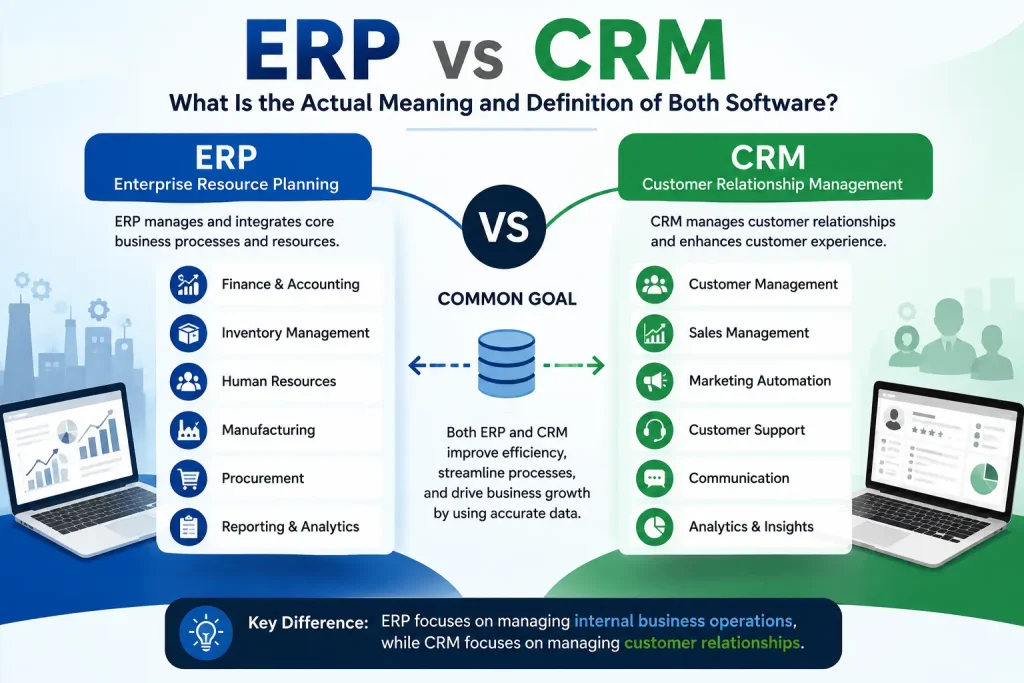
ERP vs CRM: What Is the Main Difference?
The simplest way to understand the difference is:
ERP manages the business.
CRM manages the customer relationship.
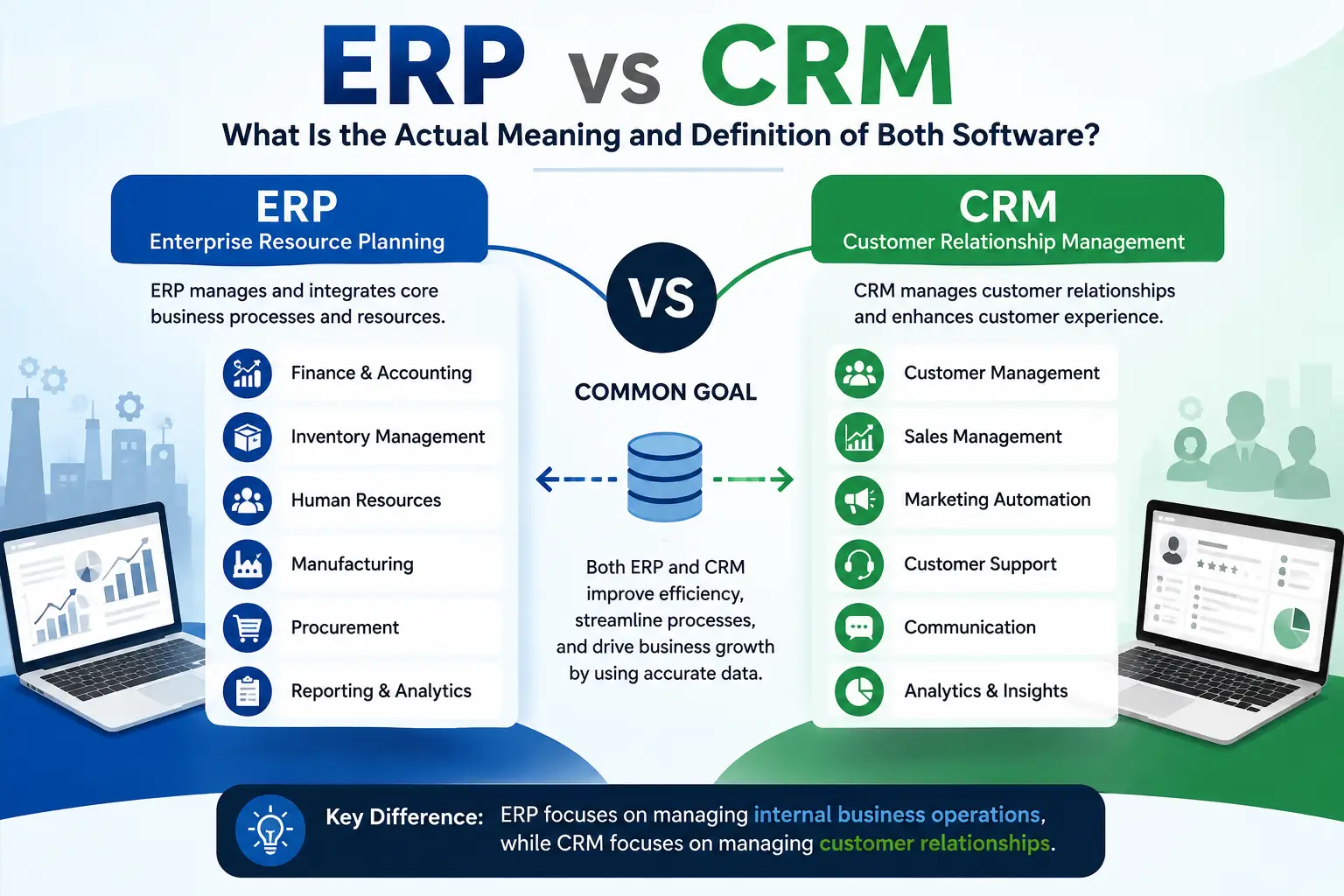
ERP focuses primarily on internal business operations, while CRM focuses primarily on customers, leads, sales, and relationships.
| ERP | CRM |
|---|---|
| Enterprise Resource Planning | Customer Relationship Management |
| Manages internal business processes | Manages customer relationships |
| Finance and accounting | Leads and contacts |
| Inventory | Sales pipeline |
| Procurement | Customer communication |
| HR and payroll | Marketing |
| Manufacturing | Customer service |
| Supply chain | Sales forecasting |
| Business-wide reporting | Customer analytics |
How Does ERP Software Work?
An ERP system connects different departments and business functions through a centralized database and integrated modules.
For example, imagine a manufacturing company receives an order for 500 products.
The ERP system may connect:
Sales → Inventory → Production → Purchasing → Warehouse → Billing → Accounting
The information flows between departments instead of being entered repeatedly into separate systems.
This can help reduce duplicate data entry and improve visibility across the organization.
How Does CRM Software Work?
CRM software focuses on the customer journey.
For example:
Website Inquiry → Lead → Sales Follow-Up → Proposal → Negotiation → Customer → Repeat Sale
A CRM can help sales teams understand where each prospect is within the sales pipeline.
It can also provide information such as:
- Who contacted the customer?
- When was the last follow-up?
- What product or service did they request?
- What is the sales opportunity worth?
- What stage is the lead in?
- When should the salesperson contact the customer again?
Key Features of ERP Software
Modern ERP platforms can include many modules depending on the organization’s requirements.
1. Finance and Accounting
ERP software can help manage:
- Invoices
- Expenses
- Payments
- Receivables
- Payables
- Financial reports
- Tax-related records
2. Inventory Management
Businesses can track:
- Stock levels
- Warehouses
- Product movement
- Stock transfers
- Purchase orders
- Reorder levels
3. Procurement Management
ERP can help organizations manage purchasing activities from supplier selection to purchase orders and receiving.
4. Human Resource Management
An ERP may include:
- Employee records
- Attendance
- Leave management
- Payroll
- Recruitment
- Performance management
5. Manufacturing Management
Manufacturing ERP systems can support:
- Production planning
- Bills of materials
- Work orders
- Raw materials
- Production tracking
- Quality management
6. Business Intelligence and Reporting
ERP systems can provide management with centralized reports and dashboards for monitoring business performance.
Key Features of CRM Software
1. Contact Management
A CRM stores customer and prospect information in an organized format.
2. Lead Management
Businesses can capture and track leads from:
- Websites
- Social media
- Phone calls
- Advertising campaigns
- Landing pages
3. Sales Pipeline Management
Sales teams can track prospects through different stages, such as:
New Lead → Qualified → Proposal → Negotiation → Won/Lost
4. Follow-Up Management
CRM systems can help salespeople remember follow-ups and manage customer communication.
5. Marketing Automation
Depending on the CRM platform, businesses may automate certain marketing activities such as email campaigns, segmentation, and lead nurturing.
6. Customer Service
CRM systems can help support teams track customer requests, complaints, tickets, and communication history.
ERP vs CRM: Which One Does Your Business Need?
There is no universal answer.
It depends on your business requirements.
Choose ERP When:
Your main challenge is managing internal operations such as:
- Inventory
- Finance
- Procurement
- Manufacturing
- HR
- Supply chain
- Multiple departments
- Business-wide reporting
Choose CRM When:
Your main challenge is managing:
- Leads
- Sales
- Customers
- Follow-ups
- Marketing
- Customer support
- Sales forecasting
Consider Both ERP and CRM When:
Your organization needs to manage both internal operations and customer-facing activities.
For example:
Customer places an order in CRM → Order information moves to ERP → Inventory is checked → Product is shipped → Invoice is generated → Accounting records the transaction
Integration between ERP and CRM can provide a more connected view of the business.
Can ERP and CRM Work Together?
Yes.
ERP and CRM can be integrated so that relevant information can flow between customer-facing and internal business processes.
For example:
CRM
Customer → Lead → Opportunity → Sales Order
↓
ERP
Inventory → Procurement → Fulfillment → Invoice → Accounting
This integration can reduce manual data entry and help different teams work with more consistent information.
However, the exact integration capabilities depend on the ERP and CRM platforms being used.
ERP vs CRM for Small Businesses
Small businesses sometimes assume ERP and CRM systems are only for large enterprises.
That is not necessarily the case.
A growing business may benefit from business software when spreadsheets and disconnected systems become difficult to manage.
A Small Business May Need CRM If:
- Leads are being lost
- Sales follow-ups are inconsistent
- Customer information is scattered
- Salespeople use separate spreadsheets
- Management cannot easily track sales opportunities
A Small Business May Need ERP If:
- Inventory is difficult to monitor
- Accounting and operations are disconnected
- Purchasing is difficult to control
- Multiple warehouses are involved
- Business processes are becoming complicated
The important consideration is not company size alone, but business complexity and operational requirements.
ERP vs CRM for Different Industries
Manufacturing
Manufacturing businesses often need ERP for production, inventory, purchasing, finance, and supply chain management.
CRM can complement ERP by managing distributors, customers, sales opportunities, and relationships.
Retail
Retail businesses can use ERP for inventory, purchasing, accounting, and product management.
CRM can help with customer loyalty, marketing, customer segmentation, and sales.
Healthcare
Healthcare organizations may use specialized systems for patient and clinical workflows, while CRM functionality can support communication, outreach, and relationship management.
Education
Educational organizations can use ERP-like systems for administration, finance, HR, fees, and operations, while CRM functionality can help manage inquiries, admissions leads, and communication.
E-Commerce
E-commerce businesses may use ERP to manage inventory, purchasing, accounting, and fulfillment, while CRM helps manage customers, marketing, sales, and retention.
Benefits of ERP Software
A properly implemented ERP system can provide several advantages.
Centralized Data
Departments can work with shared business information.
Better Operational Visibility
Management can gain a broader view of business activities.
Reduced Manual Work
Automation can reduce repetitive data entry and certain administrative tasks.
Better Reporting
Integrated data can make business reporting easier.
Improved Process Management
ERP can standardize workflows across departments.
Scalability
A well-designed ERP platform can support changing business requirements as the organization grows.
Benefits of CRM Software
Better Lead Management
Sales teams can track prospects more systematically.
Improved Follow-Ups
CRM reminders and workflows can help prevent missed opportunities.
Better Customer Visibility
Teams can access customer interaction history.
Improved Sales Management
Managers can monitor pipelines and opportunities.
Personalized Customer Engagement
Customer data can help businesses deliver more relevant communication.
Improved Customer Retention
A structured view of customer interactions can support better service and relationship management.
ERP vs CRM: Which Is More Important?
It is not accurate to say that ERP is always more important than CRM or vice versa.
They solve different problems.
For a manufacturing company that has problems with inventory and production, ERP could be the priority.
You’re running a sales-focused service company and having trouble managing leads? CRM might be your priority.
Both can be key for a growing business with complex operations and a large customer base.
The right choice depends on the organization’s business processes, goals, budget, technology environment, and future growth plans.
What Is Custom ERP and CRM Software?
Businesses do not always fit perfectly into standard software workflows.
A company may have unique processes involving:
- Specialized approval workflows
- Industry-specific inventory
- Custom sales processes
- Multiple branches
- Complex reporting
- Existing software integrations
- Custom customer portals
- Specific compliance requirements
In such cases, custom ERP or CRM development can provide functionality designed around the organization’s actual processes.
Custom software can be developed from scratch or created by extending and integrating existing platforms, depending on the project.
How Much Does ERP or CRM Software Cost?
The cost varies significantly depending on whether the business uses an existing SaaS product, customizes an existing platform, or develops a completely custom solution.
Factors affecting cost include:
- Number of users
- Number of modules
- Custom features
- Integrations
- UI/UX requirements
- Data migration
- Security requirements
- Hosting
- Mobile applications
- Reporting and dashboards
- Maintenance and support
Therefore, businesses should evaluate total cost of ownership (TCO) rather than looking only at the initial development or subscription cost.
ERP vs CRM: Frequently Asked Questions
What is the full form of ERP?
ERP stands for Enterprise Resource Planning.
What is the full form of CRM?
CRM stands for Customer Relationship Management.
What is the difference between ERP and CRM?
ERP primarily manages internal business processes such as finance, inventory, procurement, HR, manufacturing, and supply chain. CRM primarily manages customers, leads, sales, marketing, and customer relationships.
Can ERP and CRM be used together?
Yes. ERP and CRM can be integrated so customer-facing processes and internal business operations can share relevant information.
Which is better, ERP or CRM?
Neither is universally better. ERP is more suitable for managing internal operations, while CRM is focused on customer relationships and sales. The right system depends on your business requirements.
Is CRM part of ERP?
Some ERP platforms include CRM modules or CRM-like functionality, but CRM and ERP are distinct software categories. Whether CRM is included depends on the ERP platform.
Is ERP suitable for small businesses?
Yes. Small and growing businesses can use ERP when they need centralized management of finance, inventory, procurement, HR, manufacturing, or other operational processes.
Why should businesses integrate ERP and CRM?
Integration can connect customer-facing sales activities with internal operations, helping reduce duplicate data entry and improving information flow between teams.
Conclusion: ERP vs CRM Explained Simply
The easiest way to remember the difference is:
ERP manages resources and internal business operations, while CRM manages customers and relationships.
ERP helps organizations coordinate finance, inventory, procurement, HR, manufacturing, supply chain, and other internal processes.
CRM helps organizations manage leads, customers, sales, marketing, communication, and customer service.
For many growing businesses, ERP and CRM are not competing systems. They can be complementary technologies that work together to create a more connected business environment.
Businesses should map out their existing processes, identify operational issues, define measurable objectives and decide which functions need to be automated before deciding on either solution. A well-planned implementation can turn ERP and CRM from simple software tools into strategic systems for business growth.
Comments (3)
Comments are closed.
Front Office vs Back Office: How CRM and ERP Software Are Different
August 14, 2026[…] a growing organization, CRM VS ERP integration can create a complete flow from customer acquisition to order fulfillment and financial […]
CRM Core Features: Sales Tracking, Lead Generation & Marketing Automation
August 17, 2026[…] Best CRM vs ERP software have different primary purposes. […]
Is CRM Part of ERP? Do You Get CRM When You Buy ERP?
August 18, 2026[…] ERP and CRM handle different sides of a business, but those sides are closely connected. […]