




Front Office vs Back Office: How CRM and ERP Software Are Different
In modern businesses, different teams handle different responsibilities. Some employees interact directly with customers, while others manage the internal processes that keep the business running.
This is where the concepts of Front Office and Back Office become important.
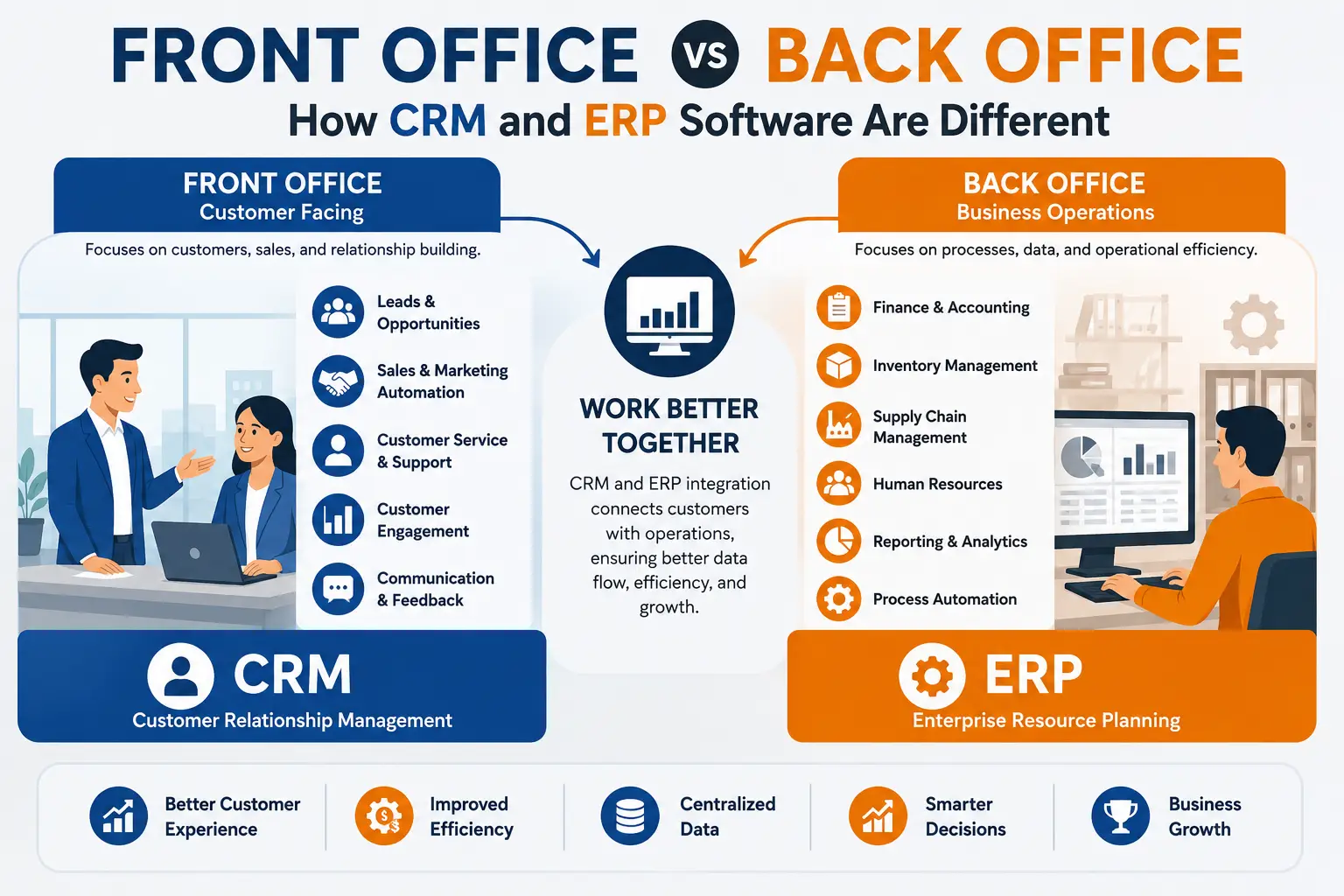
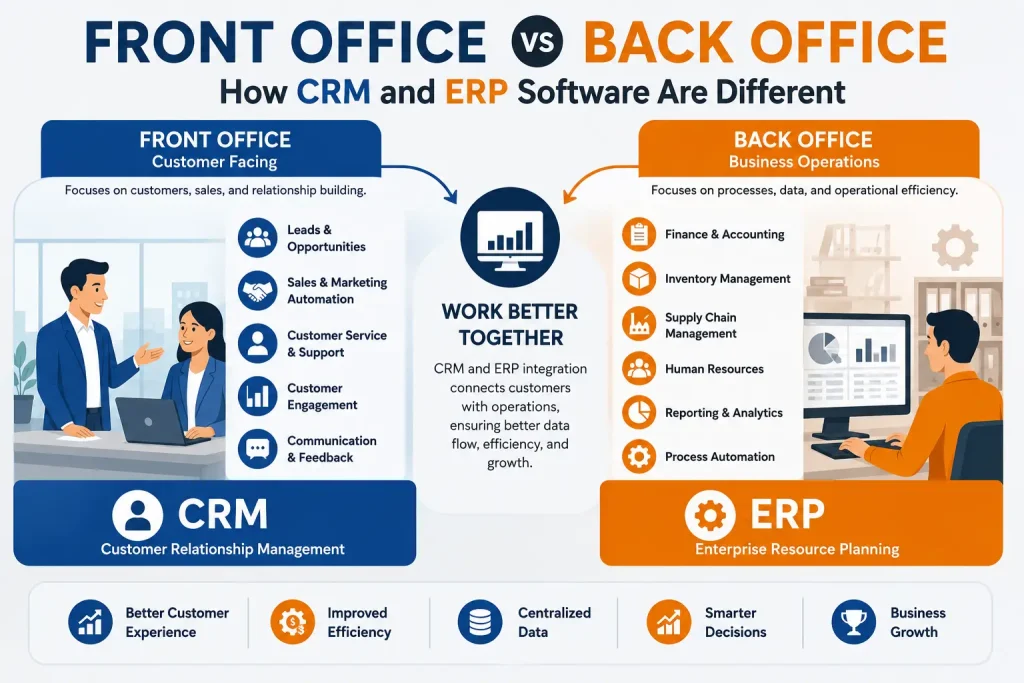
Simply put, the Front Office handles customer-facing operations and the Back Office handles internal business operations.
This difference explains the difference between Customer Relationship Management (CRM) and Enterprise Resource Planning (ERP) software.
A CRM is primarily used to support front-office activities such as sales, marketing, customer communication and customer service. An ERP is primarily used to support back-office functions such as finance, inventory, procurement, human resources, manufacturing, and supply chain management.
Let’s understand the difference in detail.
What Is the Front Office?
The Front Office refers to departments and activities that directly interact with customers, prospects, partners, or the market.
Front-office teams are often responsible for bringing in customers, maintaining relationships, generating sales, and providing customer support.
Examples of Front-Office Functions
- Sales
- Marketing
- Customer service
- Business development
- Lead generation
- Customer support
- Account management
- Customer communication
For example, when a potential customer contacts a company, the sales team receives the inquiry, follows up with the prospect, prepares a proposal, and attempts to convert the lead into a customer.
These are front-office activities.
What Is the Back Office?
The Back Office refers to the internal departments and processes that support the organization.
Back-office teams may not interact directly with customers, but their work is essential for delivering products and services successfully.
Examples of Back-Office Functions
- Finance and accounting
- Human resources
- Payroll
- Inventory management
- Procurement
- Manufacturing
- Supply chain
- Warehouse management
- Compliance
- Internal reporting
For example, when a customer places an order, the back office may check inventory, process the order, generate an invoice, arrange shipment, and record the transaction in the accounting system.
Front Office vs Back Office: The Basic Difference
The easiest way to understand the distinction is:
Front Office = Customer-facing operations
Back Office = Internal business operations
| Front Office | Back Office |
|---|---|
| Customer-facing | Internally focused |
| Sales | Finance |
| Marketing | Accounting |
| Customer service | HR |
| Lead management | Payroll |
| Customer communication | Inventory |
| Business development | Procurement |
| CRM commonly supports it | ERP commonly supports it |
However, this doesn’t mean CRM is only front office software or ERP is only back office software. Modern platforms increasingly overlap and integrate with each other.
What Is CRM Software?
CRM stands for Customer Relationship Management.
CRM software helps businesses manage their interactions with current and potential customers.
It is primarily designed to help customer-facing teams organize and manage the customer lifecycle.
CRM Commonly Manages
- Leads
- Contacts
- Customer profiles
- Sales opportunities
- Sales pipelines
- Follow-ups
- Emails
- Calls
- Marketing campaigns
- Customer support
- Customer interactions
- Sales forecasting
=”3618″>For example:
Website Inquiry → Lead → Follow-Up → Proposal → Negotiation → Customer
A CRM helps sales teams track this journey.
What Is ERP Software?
ERP stands for Enterprise Resource Planning.
ERP software integrates core internal business processes into a centralized system.
It helps organizations manage resources, transactions, workflows, and operational data.
ERP Commonly Manages
- Accounting
- Finance
- Inventory
- Purchasing
- Sales orders
- Manufacturing
- Warehousing
- Supply chain
- Human resources
- Payroll
- Business reporting
=”4191″>For example:
Customer Order → Inventory Check → Procurement/Production → Warehouse → Delivery → Invoice → Accounting
An ERP helps coordinate these internal processes.
CRM vs ERP: How Are They Different?
The fundamental difference is the business area they primarily support.
CRM Focuses on Customers
CRM answers questions such as:
- Who are our customers?
- Where did this lead come from?
- What products are they interested in?
- When should the salesperson follow up?
- What stage is the opportunity in?
- What interactions have we had with this customer?
ERP Focuses on Operations
ERP answers questions such as:
- How much inventory do we have?
- What did we purchase?
- What do we owe suppliers?
- What are our expenses?
- What products need to be manufactured?
- What invoices are outstanding?
- What are our financial results?
Front Office and CRM
CRM software is particularly useful for front-office teams because it provides a centralized view of customer relationships.
Sales
Sales teams can use CRM to:
- Capture leads
- Assign leads
- Track opportunities
- Schedule follow-ups
- Manage sales pipelines
- Create quotations
- Monitor sales performance
Marketing
Marketing teams can use CRM data to:
- Segment customers
- Manage campaigns
- Track marketing leads
- Measure campaign performance
- Automate selected communications
Customer Service
Customer service teams can use CRM to:
- Record customer issues
- Track support requests
- Review interaction history
- Manage tickets
- Improve customer communication
Back Office and ERP
ERP software supports the internal processes required to operate the organization.
Finance and Accounting
ERP can help manage:
- Accounts payable
- Accounts receivable
- Expenses
- Invoices
- Financial transactions
- Financial reporting
Inventory
Businesses can monitor:
- Stock levels
- Warehouses
- Stock movement
- Reorder levels
- Transfers
- Product availability
Procurement
ERP can help manage:
Purchase Request → Purchase Order → Supplier → Goods Received → Invoice
Human Resources
ERP systems may also include:
- Employee records
- Attendance
- Leave
- Payroll
- Recruitment
- Employee management
Manufacturing
Manufacturing ERP systems can support:
- Production planning
- Work orders
- Bills of materials
- Raw materials
- Production tracking
- Quality processes
How CRM and ERP Work Together
CRM and ERP are not necessarily competing systems.
In many organizations, they work together.
Consider an e-commerce business.
Step 1: Customer Interaction
A customer visits the website and submits an inquiry.
CRM: Records the lead.
Step 2: Sales Process
A salesperson contacts the customer and converts the lead into an order.
CRM: Tracks the opportunity and customer relationship.
Step 3: Order Processing
The order is sent to the internal operations system.
ERP: Checks inventory and processes fulfillment.
Step 4: Delivery
The warehouse prepares and ships the order.
ERP: Manages inventory and logistics information.
Step 5: Billing
An invoice is generated.
ERP: Records the financial transaction.
Step 6: Customer Follow-Up
The company contacts the customer for feedback or future purchases.
CRM: Manages customer engagement.
This creates a connected process:
Customer → CRM → ERP → Fulfillment → Accounting → CRM
Why Should Businesses Integrate CRM and ERP?
When CRM and ERP operate as disconnected systems, employees may need to manually transfer information between platforms.
This can create:
- Duplicate data
- Manual work
- Delays
- Inconsistent information
- Reporting problems
- Poor visibility
Integration can allow relevant information to move between systems automatically.
For example, when a sales order is created in CRM, relevant order information can be transferred to ERP for inventory, fulfillment, and billing processes.
Front Office vs Back Office Example
Let’s take a manufacturing company as an example.
A customer contacts the company and asks for a quotation.
Front Office
The sales representative:
- Creates the customer record.
- Records the inquiry.
- Prepares a quotation.
- Follows up.
- Converts the opportunity into an order.
This is primarily a CRM workflow.
Back Office
After receiving the order:
- Inventory is checked.
- Raw materials are purchased if required.
- Production is scheduled.
- Products are manufactured.
- Goods are dispatched.
- Invoice is generated.
- Payment is recorded.
This is primarily an ERP workflow.
CRM vs ERP: Feature Comparison
| Feature | CRM | ERP |
|---|---|---|
| Primary purpose | Customer management | Business resource management |
| Main focus | Front office | Back office |
| Lead management | ✓ | Usually limited |
| Customer management | ✓ | May be available |
| Sales pipeline | ✓ | Sometimes |
| Marketing | ✓ | Limited/varies |
| Customer support | ✓ | Limited/varies |
| Accounting | Limited/varies | ✓ |
| Inventory | Limited/varies | ✓ |
| Procurement | Limited/varies | ✓ |
| Manufacturing | Usually no | ✓ |
| HR & Payroll | Usually no | ✓ |
| Supply chain | Usually no | ✓ |
| Financial reporting | Limited/varies | ✓ |
Modern enterprise platforms can blur these boundaries, so exact capabilities depend on the software vendor and modules implemented.
Which Is Better: CRM or ERP?
There is no universal winner.
The right software depends on your business problem.
Choose CRM If Your Main Challenge Is:
- Losing leads
- Poor sales follow-up
- Disorganized customer data
- Low sales visibility
- Poor customer communication
- Managing marketing campaigns
- Customer support management
We Choose ERP If Your Main Challenge Is:
- Inventory management
- Accounting
- Procurement
- Manufacturing
- Supply chain
- Warehouse management
- HR and payroll
- Internal business reporting
Choose Both If:
Your organization needs to manage customer relationships and internal operations together.
For a growing organization, CRM VS ERP integration can create a complete flow from customer acquisition to order fulfillment and financial management.
Can a Small Business Use CRM and ERP?
Yes.
Small businesses don’t necessarily need a large enterprise platform from day one.
A growing business might begin with CRM to organize sales and customer information. As its operations become more complex, it may add ERP capabilities for inventory, accounting, procurement, HR, or manufacturing.
The important factor is not simply the number of employees. It is the complexity of business processes and the organization’s need for automation and centralized information.
Custom CRM and ERP Software
Standard software may not always match every organization’s workflow.
Businesses with specialized requirements can consider custom ERP and CRM software development.
Custom solutions may be useful when a company requires:
- Industry-specific workflows
- Multiple branches
- Custom approval processes
- Specialized dashboards
- Existing software integration
- Custom customer portals
- Advanced reporting
- Unique inventory processes
- Automated business workflows
A business can also integrate existing CRM and ERP platforms rather than developing both systems from scratch.
hat Is the Difference Between Front Office and Back Office in Simple Terms?
Think about a restaurant.
Front Office
The waiter interacts with customers, takes orders, answers questions, and provides service.
Back Office
The kitchen prepares the food, inventory staff manage ingredients, finance handles payments, and management monitors operations.
The customer primarily sees the front office, but the back office makes it possible for the business to deliver its service.
The same principle applies to business software.
CRM supports customer-facing activities.
ERP supports internal business operations.
Frequently Asked Questions
What is the difference between front office and back office?
The front office handles customer-facing activities such as sales, marketing, and customer service. The back office manages internal processes such as accounting, inventory, HR, procurement, and operations.
Is CRM a front-office software?
CRM is primarily considered front-office software because it focuses on customers, leads, sales, marketing, and customer service.
Can CRM and ERP be integrated?
Yes. CRM and ERP can be integrated to connect customer-facing activities with internal operational processes.
Which is more important, CRM or ERP?
Neither is universally more important. CRM is important for customer acquisition and relationship management, while ERP is important for internal operations and resource management.
Does ERP include CRM?
Some modern ERP platforms include CRM modules or CRM functionality. However, the depth of CRM capabilities varies between ERP products.
Can a business use CRM without ERP?
Yes. A business can use CRM independently to manage leads, sales, customers, marketing, and support.
Can a business use ERP without CRM?
Yes. An organization can use ERP to manage internal operations without implementing a dedicated CRM system.
Conclusion
The difference between Front Office and Back Office provides a simple way to understand the roles of CRM and ERP software.
Front Office = Customer-facing activities
Back Office = Internal business operations
CRM = Primarily manages customers, leads, sales, marketing, and service.
ERP = Primarily manages finance, inventory, procurement, HR, manufacturing, supply chain, and other internal operations.
However, modern businesses increasingly need these systems to work together. A well-integrated CRM and ERP environment can connect the complete business journey—from the first customer interaction to sales, fulfillment, invoicing, and ongoing customer relationships.