




Is CRM Part of ERP? Do You Get CRM When You Buy ERP?
When businesses evaluate software for managing their operations, one common question is:
“If I buy an ERP system, does it automatically include CRM?”
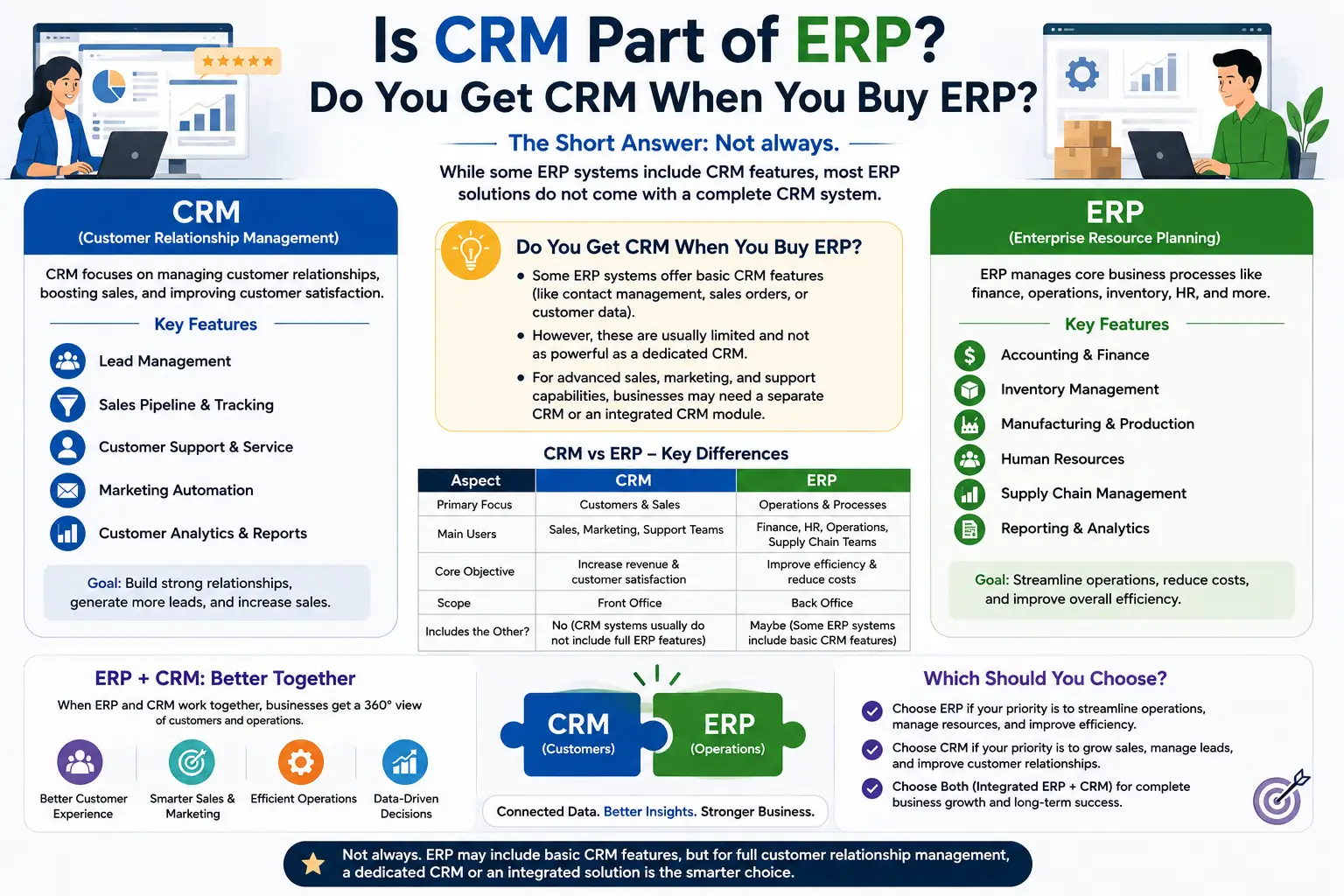
The short answer is: sometimes, but not always.
Some modern ERP platforms include CRM functionality as an integrated module, while others focus primarily on finance, inventory, manufacturing, supply chain, HR, and other back-office processes. In some cases, businesses purchase a separate CRM and integrate it with their ERP.
The important point is that ERP and CRM are different software categories, even when they are offered together in one platform.
What Is ERP?
ERP stands for Enterprise Resource Planning.
ERP software is primarily designed to manage an organization’s internal business processes and resources.
Typical ERP modules include:
- Accounting and finance
- Inventory management
- Procurement
- Manufacturing
- Supply chain
- Warehouse management
- Human resources
- Payroll
- Project management
- Business reporting
For example:
Purchase → Inventory → Production → Warehouse → Delivery → Accounting
ERP connects these internal processes through a centralized system.
What Is CRM?
CRM stands for Customer Relationship Management.
CRM software focuses primarily on customer-facing activities and relationships.
Typical CRM features include:
- Lead generation
- Contact management
- Sales tracking
- Sales pipeline management
- Marketing automation
- Customer support
- Follow-ups
- Customer communication
- Sales forecasting
- Customer analytics
A typical CRM workflow is:
Lead → Qualification → Opportunity → Sales → Customer → Retention
So, Is CRM Part of ERP?
Sometimes Yes — But It Depends on the ERP.
Some ERP products provide CRM as a built-in module. Others offer only limited customer-management functionality, while some organizations integrate a dedicated CRM platform with their ERP.
Therefore, buying an ERP does not automatically mean you are getting a full-featured CRM.
Before purchasing an ERP, businesses should check the specific product’s modules and capabilities.
Why Do Some ERP Systems Include CRM?
ERP and CRM handle different sides of a business, but those sides are closely connected.
Consider a company receiving a new customer order.
CRM handles:
- Lead
- Customer
- Sales opportunity
- Follow-up
- Quotation
- Sales communication
ERP handles:
- Inventory
- Procurement
- Order fulfillment
- Delivery
- Invoice
- Accounting
The complete process can look like:
Lead → CRM → Sales Order → ERP → Inventory → Delivery → Accounting
Integrating these processes can reduce duplicate data entry and improve visibility.
ERP With Built-In CRM vs Separate CRM
There are two common approaches.
1. ERP With Built-In CRM
Some ERP platforms provide CRM as one of their modules.
Advantages
- One platform
- Centralized data
- Fewer integrations
- Shared user management
- Connected sales and operational workflows
- Potentially simpler administration
Potential Limitation
The CRM functionality may not be as deep or specialized as a dedicated CRM platform, depending on the ERP product.
2. Separate CRM + ERP
A business can use a dedicated CRM for customer-facing processes and a separate ERP for internal operations.
For example:
CRM
Lead → Sales → Customer
↓
ERP
Inventory → Procurement → Fulfillment → Accounting
Advantages
- Specialized CRM functionality
- Specialized ERP functionality
- Greater flexibility
- Ability to select best-fit systems for different departments
Potential Limitation
The systems need to be properly integrated and maintained.
ERP vs CRM: What’s the Difference?
| ERP | CRM |
|---|---|
| Enterprise Resource Planning | Customer Relationship Management |
| Primarily internal operations | Primarily customer-facing operations |
| Accounting | Lead management |
| Inventory | Sales tracking |
| Procurement | Customer management |
| Manufacturing | Marketing automation |
| Supply chain | Customer support |
| HR & payroll | Sales pipeline |
| Financial reporting | Customer analytics |
The distinction is not absolute because modern business platforms increasingly overlap.
What CRM Features Should You Look for in an ERP?
If you want an ERP that includes CRM, don’t simply look for the word “CRM” in the feature list.
Check what functionality is actually provided.
Lead Management
Can the system capture and manage leads?
Sales Pipeline
Can salespeople track opportunities through different stages?
Contact Management
Can the system maintain detailed customer and prospect information?
Follow-Up Management
Can users schedule calls, meetings, emails, and follow-ups?
Marketing Automation
Does it support campaigns, lead nurturing, segmentation, or automated communication?
Customer Support
Can the system manage customer inquiries, tickets, or service requests?
Sales Reporting
Can managers analyze pipeline, conversion, revenue, and salesperson performance?
Integrations
Can the CRM connect with websites, email, advertising platforms, e-commerce systems, and other business applications?
The depth of these features matters more than simply whether an ERP advertises “CRM functionality.”
When Should a Business Choose ERP With CRM?
An integrated ERP + CRM solution can be attractive when a business wants one centralized platform.
It can be particularly useful when:
- The company wants fewer separate systems
- Sales and operations need to share data
- Inventory must connect with sales
- Orders need to connect with accounting
- Management wants centralized reporting
- The organization prefers one technology platform
For example:
Customer Inquiry → Sales → Order → Inventory → Delivery → Invoice
can be managed through connected modules.
When Should You Choose a Separate CRM?
A separate CRM may make more sense when customer-facing processes are particularly sophisticated.
For example, a company may require:
- Advanced sales automation
- Complex lead scoring
- Extensive marketing automation
- Sophisticated customer segmentation
- Large-scale sales pipelines
- Advanced customer service
- Extensive third-party integrations
In these situations, a specialized CRM may provide deeper functionality than the CRM module included in a particular ERP.
Is CRM Included in Every ERP?
No.
ERP functionality varies significantly between products.
One ERP may include:
ERP + CRM + HR + Payroll + Inventory + Accounting
while another may focus mainly on:
Finance + Inventory + Procurement + Manufacturing
Some platforms may offer CRM as an optional module or through an additional product.
Therefore, businesses should review the actual product documentation, licensing, modules, and implementation scope before purchasing.
Can ERP and CRM Be Integrated?
Yes.
Even when CRM and ERP are separate applications, they can often be integrated.
For example:
CRM
Customer → Lead → Opportunity → Sales Order
↓
ERP
Inventory → Procurement → Fulfillment → Invoice
↓
CRM
Customer Service → Follow-Up → Repeat Sales
This can create an end-to-end business workflow.
Example: CRM and ERP for a Manufacturing Company
Imagine a manufacturing company receives an inquiry for 1,000 units.
CRM
The salesperson:
- Creates the lead.
- Records customer details.
- Tracks communication.
- Sends a quotation.
- Follows up.
- Converts the opportunity into an order.
ERP
The operations team:
- Checks inventory.
- Reviews raw materials.
- Creates a production plan.
- Purchases missing materials.
- Manufactures the products.
- Updates inventory.
- Ships the order.
- Generates the invoice.
The systems can then share relevant information.
This demonstrates why CRM and ERP integration can be valuable.
What Is Better: Integrated ERP + CRM or Separate Systems?
There is no universal answer.
Integrated ERP + CRM may be better when:
- You want one platform
- Business processes are closely connected
- Your CRM requirements are relatively straightforward
- You want centralized reporting
- You want to minimize the number of systems
Separate ERP + CRM may be better when:
- Sales and marketing are highly sophisticated
- You need advanced CRM functionality
- Your ERP has limited CRM capabilities
- Different departments require specialized platforms
- You need flexibility to select best-in-class tools
The decision should be based on business requirements rather than the software label.
Frequently Asked Questions
Is CRM included in ERP?
Sometimes. Some ERP systems include CRM as a built-in module, while others do not or offer it as an optional component.
Is CRM the same as ERP?
No. CRM primarily manages customers, leads, sales, marketing, and service, while ERP primarily manages internal business processes such as accounting, inventory, procurement, manufacturing, HR, and supply chain.
Can ERP replace CRM?
It can in some cases if the ERP includes sufficiently capable CRM functionality. However, businesses with advanced sales or marketing requirements may still prefer a dedicated CRM.
Can CRM replace ERP?
Generally, no. CRM is not designed to replace core ERP functions such as accounting, manufacturing, procurement, inventory, or supply chain management.
Can ERP and CRM work together?
Yes. An ERP and CRM can be integrated so that customer, sales, order, inventory, fulfillment, and financial information can flow between systems.
Should a small business buy ERP with CRM?
It depends on the business. A small service business may primarily need CRM, while a manufacturing or inventory-heavy business may need ERP. Businesses requiring both can consider an integrated solution.
Does buying ERP mean I get a complete CRM?
No. Always check the specific ERP’s CRM features, licensing, modules, integrations, and implementation scope before assuming it includes a full CRM.
Conclusion
Is CRM part of ERP?
The correct answer is:
CRM can be part of an ERP system, but it is not automatically included in every ERP solution.
ERP and CRM serve different primary purposes:
ERP → Internal business operations
CRM → Customer and sales management
Some modern platforms combine both into a single business management system. Other businesses use separate ERP and CRM platforms and integrate them.
Before selecting an ERP, businesses should evaluate whether its CRM capabilities actually cover their requirements for lead generation, sales tracking, marketing automation, customer support, and relationship management.
The best solution is the one that provides the right functionality, integration, scalability, and total cost of ownership for the organization’s specific business processes.