






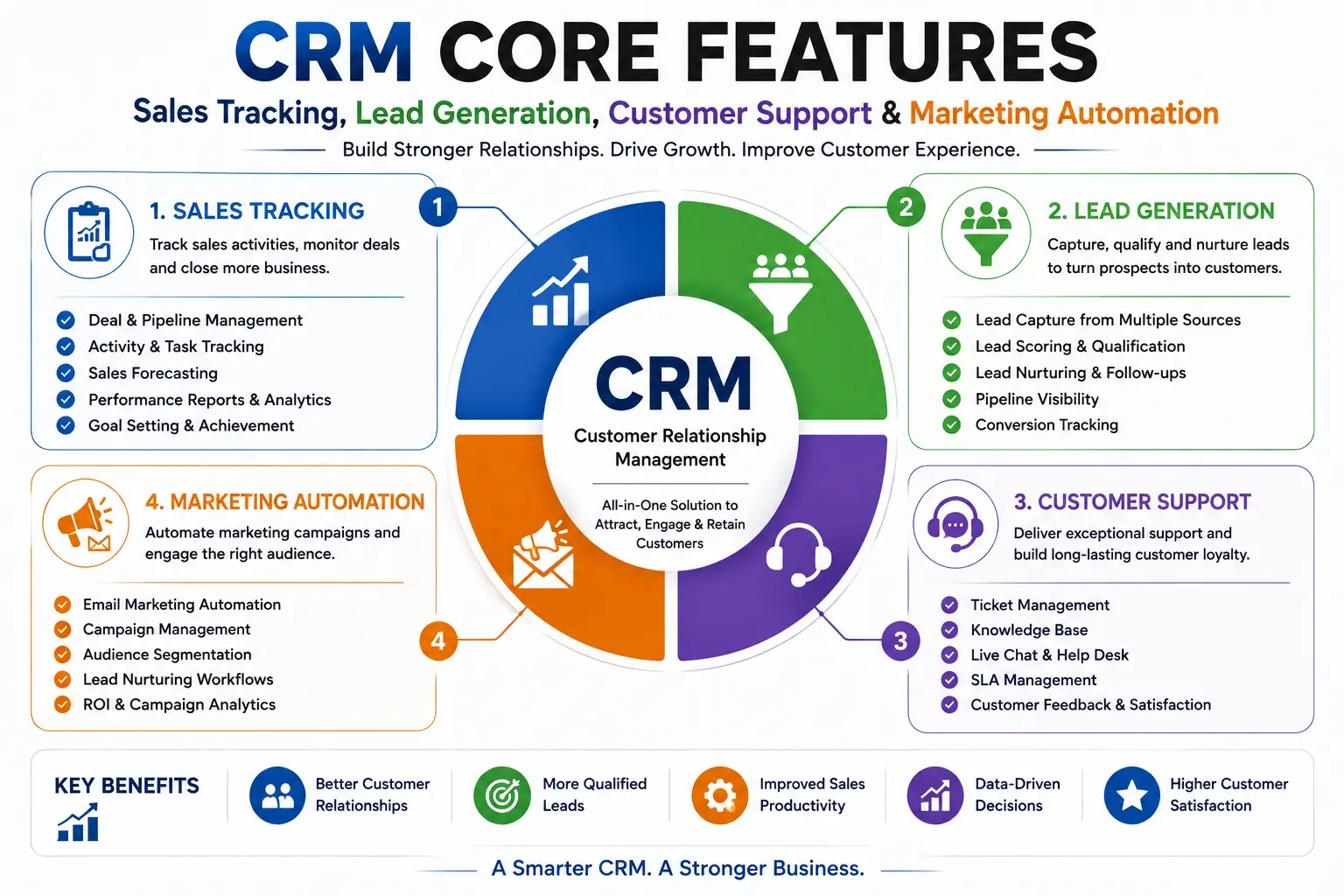
CRM Core Features: Sales Tracking, Lead Generation, Customer Support & Marketing Automation
In a competitive digital marketplace, businesses need more than a list of customer names and phone numbers. They need a system that can capture leads, track sales opportunities, manage customer communication, automate marketing activities, and provide better customer support.
This is where CRM (Customer Relationship Management) software becomes important.
A modern CRM system brings customer-related information and activities into one centralized platform. The core features people commonly search for include sales tracking, lead generation, customer support, contact management, and marketing automation.
This guide explains the major CRM core features, how they work, and how they can help businesses improve sales and customer relationships.
What Is CRM Software?
CRM stands for Customer Relationship Management.
CRM software is designed to help businesses manage interactions with current customers and potential customers throughout the customer lifecycle.
In simple terms:
CRM software helps businesses organize customer information, generate and manage leads, track sales, automate marketing, and provide better customer service.
A typical CRM journey can look like:
Lead → Qualified Lead → Opportunity → Customer → Repeat Customer
The CRM records relevant activities at each stage.
What Are the Core Features of CRM?
The exact functionality varies by CRM platform, but the most important CRM features generally include:
- Contact Management
- Lead Generation
- Lead Management
- Sales Tracking
- Sales Pipeline Management
- Customer Support
- Marketing Automation
- Communication Management
- Task and Follow-Up Management
- Reporting and Analytics
- Workflow Automation
- Customer Segmentation
- Mobile CRM
- Integrations
Let’s examine each feature.
1. Contact Management
Contact management is one of the basic functions of CRM software.
A CRM can maintain centralized information about customers and prospects.
Contact information may include:
- Name
- Phone number
- Email address
- Company
- Job title
- Location
- Previous interactions
- Purchase history
- Notes
- Communication history
Instead of storing customer information across spreadsheets, emails, and individual employee devices, teams can access it from a centralized system.
Why Is Contact Management Important?
It gives sales and support teams a more complete view of the customer.
For example, before calling a customer, a salesperson can review previous conversations, inquiries, purchases, and pending opportunities.
2. Lead Generation
Lead generation is the process of attracting and capturing potential customers.
CRM software can collect leads from multiple channels.
Common lead sources include:
- Website forms
- Landing pages
- Social media
- Email campaigns
- Online advertisements
- Phone calls
- Chat
- Events
- Referrals
For example:
Google Ad → Landing Page → Lead Form → CRM → Sales Representative
Once the lead enters the CRM, the sales team can begin the qualification and follow-up process.
3. Lead Management
Generating leads is only the first step.
Businesses also need to organize, qualify, assign, and follow up with those leads.
CRM lead management can help businesses:
- Capture leads
- Assign leads to salespeople
- Categorize leads
- Score leads
- Track lead status
- Schedule follow-ups
- Record communication
- Convert qualified leads into opportunities
A typical lead pipeline may look like:
New → Contacted → Qualified → Proposal → Negotiation → Won/Lost
This gives sales managers greater visibility into the sales process.
4. Sales Tracking
Sales tracking is one of the most important CRM features.
A CRM allows sales teams to monitor opportunities from the first interaction through conversion.
Sales tracking may include:
- Lead source
- Salesperson
- Opportunity value
- Sales stage
- Expected closing date
- Customer communication
- Follow-up activities
- Proposal status
- Won/lost status
Managers can use this information to understand current sales performance and identify opportunities that need attention.
5. Sales Pipeline Management
A sales pipeline visually represents where prospects are within the buying process.
For example:
New Lead → Qualified → Demo → Proposal → Negotiation → Closed
CRM software can provide a dashboard showing how many opportunities exist at each stage.
Why Is Pipeline Management Important?
It can help businesses identify:
- Which leads are close to conversion?
- Which salespeople have the most opportunities?
- Where are prospects getting stuck?
- How much potential revenue is in the pipeline?
- Which opportunities need immediate follow-up?
This can make sales management more systematic.
6. Customer Support Management
CRM is not only for sales.
Customer support is another important CRM function.
A CRM or integrated customer service module can help businesses manage:
- Customer inquiries
- Complaints
- Support tickets
- Service requests
- Communication history
- Issue status
- Support assignments
- Resolution tracking
For example:
Customer Complaint → Support Ticket → Assigned Agent → Resolution → Customer Follow-Up
This creates a structured process for managing customer issues.
7. Marketing Automation
Marketing automation is a major feature of modern CRM platforms.
Instead of manually performing every marketing activity, businesses can automate selected repetitive tasks.
Marketing automation may include:
- Email campaigns
- Lead nurturing
- Customer segmentation
- Automated follow-ups
- Campaign scheduling
- Lead scoring
- Drip campaigns
- Marketing notifications
- Campaign analytics
For example, when someone downloads an e-book from a company’s website, the CRM can potentially trigger a predefined email sequence.
8. Email Marketing Integration
CRM platforms can integrate with email marketing systems or provide built-in email functionality.
Businesses can use this to:
- Send campaigns
- Track customer communication
- Segment contacts
- Schedule messages
- Monitor campaign engagement
- Automate follow-ups
Connecting email activity with customer records can help sales teams understand the communication history.
9. Customer Segmentation
Not every customer has the same needs.
CRM systems can divide customers into groups based on characteristics such as:
- Location
- Industry
- Purchase history
- Customer type
- Lead status
- Product interest
- Engagement
- Sales value
For example, an e-commerce business could create segments such as:
New Customers
Repeat Customers
High-Value Customers
Inactive Customers
This can support more relevant marketing and communication.
10. Task and Follow-Up Management
Missed follow-ups can result in lost sales.
CRM systems can help sales teams schedule:
- Calls
- Meetings
- Emails
- Demonstrations
- Follow-ups
- Tasks
- Reminders
A salesperson can see upcoming activities from a centralized dashboard.
For example:
Lead Added → Call Scheduled → Follow-Up → Proposal → Reminder → Closing
This creates greater consistency in the sales process.
11. Customer Communication History
A CRM can maintain a history of customer interactions.
Depending on the platform and integrations, this may include:
- Emails
- Calls
- Meetings
- Notes
- Support tickets
- Purchases
- Website interactions
This helps employees understand what has already happened before contacting the customer.
12. Sales Forecasting
CRM data can support sales forecasting.
Managers can analyze:
- Open opportunities
- Deal values
- Sales stages
- Expected closing dates
- Historical conversion rates
- Salesperson performance
This can help businesses estimate future revenue and identify potential gaps in sales performance.
Forecasting quality depends on the quality and completeness of CRM data.
13. Workflow Automation
CRM workflow automation can reduce repetitive administrative tasks.
For example:
New Lead Created → Automatically Assign Salesperson → Send Notification → Create Follow-Up Task
Another workflow could be:
Deal Won → Update Customer Status → Notify Finance → Create Onboarding Task
Automation can help standardize recurring processes.
14. Reporting and Analytics
CRM dashboards provide businesses with information about sales and customer activity.
Common CRM reports include:
- Number of leads
- Lead conversion rate
- Sales by salesperson
- Sales by source
- Revenue
- Open opportunities
- Won/lost deals
- Customer acquisition
- Campaign performance
- Support tickets
- Customer retention
These reports can help managers make data-driven decisions.
15. Customer Retention Management
CRM systems can help businesses maintain relationships after the initial sale.
Companies can track:
- Previous purchases
- Customer communication
- Service requests
- Renewal dates
- Follow-ups
- Customer engagement
Businesses can use this information to identify opportunities for repeat purchases, renewals, cross-selling, and upselling.
16. Mobile CRM
Sales representatives are often away from their desks.
Mobile CRM applications allow teams to access customer information while traveling or meeting customers.
Mobile CRM can provide access to:
- Leads
- Contacts
- Tasks
- Sales opportunities
- Customer history
- Notes
- Notifications
- Follow-ups
This can be particularly useful for field sales teams.
17. CRM Integrations
Modern CRM systems often integrate with other business tools.
Common integrations include:
- Websites
- WhatsApp or messaging platforms
- Payment systems
- Accounting software
- ERP
- Marketing platforms
- E-commerce systems
- Customer support tools
- Analytics platforms
For example:
Website → CRM → Sales Team → ERP → Accounting
Integration can reduce duplicate data entry and create a more connected business workflow.
CRM Core Features at a Glance
| CRM Feature | Main Purpose |
|---|---|
| Contact Management | Store customer information |
| Lead Generation | Capture potential customers |
| Lead Management | Qualify and track leads |
| Sales Tracking | Monitor sales activities |
| Sales Pipeline | Track opportunities by stage |
| Customer Support | Manage inquiries and issues |
| Marketing Automation | Automate marketing activities |
| Email Integration | Manage customer communication |
| Task Management | Schedule follow-ups |
| Segmentation | Group customers |
| Sales Forecasting | Estimate future sales |
| Reporting | Analyze business performance |
| Workflow Automation | Automate repetitive tasks |
| Mobile CRM | Manage customers remotely |
| Integrations | Connect CRM with other systems |
How CRM Features Work Together
The real benefit of CRM comes from combining its features.
Consider a company offering software services.
Step 1: Lead Generation
A visitor submits a website inquiry.
Website → CRM
Step 2: Lead Management
The CRM automatically records the lead and assigns it to a salesperson.
Step 3: Sales Tracking
The salesperson contacts the prospect and moves the lead through the sales pipeline.
Step 4: Follow-Up
The CRM creates reminders for calls, meetings, and proposals.
Step 5: Conversion
The prospect becomes a customer.
Step 6: Customer Support
The support team can access the customer’s information and manage future service requests.
Step 7: Marketing Automation
The customer can receive relevant newsletters, product updates, or renewal reminders.
The complete journey becomes:
Lead Generation → Sales → Customer → Support → Retention
CRM vs ERP: What’s the Difference?
Best CRM vs ERP software have different primary purposes.
CRM Focuses on:
- Customers
- Leads
- Sales
- Marketing
- Customer service
- Customer relationships
ERP Focuses on:
- Finance
- Accounting
- Inventory
- Procurement
- Manufacturing
- Supply chain
- HR
- Payroll
In simple terms:
CRM manages customer-facing processes, while ERP manages core internal business operations.
However, many modern businesses integrate CRM vs ERP so customer-facing activities can connect with finance, inventory, fulfillment, and other internal processes.
Why Is CRM Important for Businesses?
A well-implemented CRM can help businesses:
Improve Lead Management
All leads can be organized in one system.
Increase Sales Visibility
Managers can see opportunities across the sales pipeline.
Improve Follow-Ups
Automated reminders can reduce missed sales opportunities.
Strengthen Customer Relationships
Teams can access customer history and interactions.
Automate Marketing
Repetitive marketing activities can be automated.
Improve Customer Service
Support teams can organize customer requests and communication.
Support Data-Driven Decisions
Reports and dashboards can provide insight into sales and customer activity.
Who Needs CRM Software?
CRM software can be useful for businesses of different sizes and industries.
IT and Software Companies
CRM can manage:
- B2B leads
- Software inquiries
- Demos
- Proposals
- Renewals
Real Estate
CRM can track:
- Property inquiries
- Buyers
- Sellers
- Site visits
- Follow-ups
Healthcare
CRM can support:
- Patient inquiries
- Appointment communication
- Follow-ups
- Outreach
Education
CRM can manage:
- Admission inquiries
- Student prospects
- Counseling
- Follow-ups
E-Commerce
CRM can help with:
- Customer segmentation
- Repeat purchases
- Marketing campaigns
- Customer service
Professional Services
Consulting, legal, financial, and other professional businesses can use CRM to manage leads, clients, communication, and service relationships.
Custom CRM Software Development
Not every organization works in the same way.
Businesses with unique workflows may require customized CRM software.
Custom CRM development can include:
- Custom lead workflows
- Industry-specific dashboards
- Automated notifications
- Custom sales pipelines
- Customer portals
- Mobile applications
- Third-party integrations
- Advanced reporting
- Custom approval processes
For businesses with complex requirements, custom CRM can be developed around existing workflows rather than forcing employees to change everything to fit a standard system.
Frequently Asked Questions About CRM Features
What are the core features of CRM software?
The core CRM features include contact management, lead generation, lead management, sales tracking, sales pipeline management, customer support, marketing automation, task management, reporting, analytics, and integrations.
How does CRM help with lead generation?
CRM software can capture leads from websites, forms, advertising campaigns, social media, email, phone calls, and other channels and organize them for sales follow-up.
Can CRM track sales?
Yes. CRM software can track leads, opportunities, sales stages, deal values, follow-ups, expected closing dates, and won or lost deals.
Does CRM include customer support?
Many CRM platforms include customer service or integrate with dedicated support systems to manage tickets, inquiries, complaints, and customer communication.
What is marketing automation in CRM?
Marketing automation allows businesses to automate selected marketing activities such as email campaigns, lead nurturing, segmentation, follow-ups, and campaign workflows.
Can CRM improve customer retention?
CRM can support retention by maintaining customer history, tracking interactions, scheduling follow-ups, identifying renewal opportunities, and enabling more personalized communication.
Can CRM and ERP work together?
Yes. CRM and ERP can be integrated to connect sales and customer information with internal processes such as inventory, accounting, procurement, and order fulfillment.
Is CRM useful for small businesses?
Yes. Small businesses can use CRM to organize customer data, manage leads, track sales, improve follow-ups, and automate selected marketing activities.
Conclusion
CRM software is more than a digital contact list. It is a customer and sales management platform that can connect lead generation, sales tracking, marketing, customer service, and relationship management.
The most important CRM core features include:
Lead Generation → Lead Management → Sales Tracking → Sales Pipeline → Customer Support → Marketing Automation → Reporting → Customer Retention
For businesses looking to improve sales efficiency and customer relationships, the right CRM should be selected based on actual business processes, sales cycles, customer needs, integrations, scalability, and budget.
When implemented properly, CRM software can help businesses move from scattered customer information and manual follow-ups to a centralized, measurable, and more automated customer management process.